Nested Equations
You can write equations inside another equation. There are currently three types of nested equations/variables.
Constants
You can declare a constant number to reuse in multiple equations as a variable.
g(x) = ln(x)*G
f(x) = 0.5*G
G: 10
Lists of Values
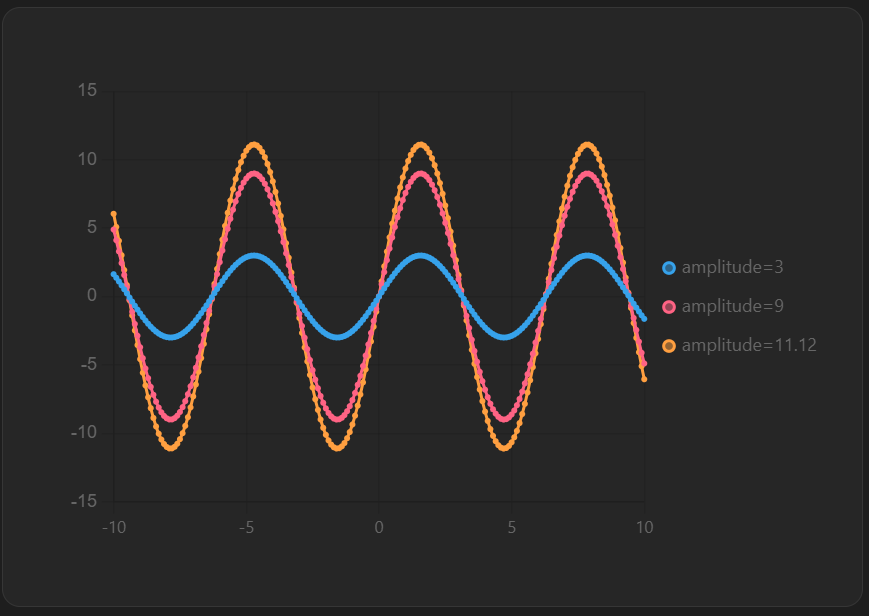
You can declare a nested function as a list of variables to create multiple plots for one equation.
y = sin(x)*amplitude
amplitude: [3,9,11.12]
obj.plugins.legend.display = true
Equations that depend on main variable
You can declare a nested function as a function that also depends on the main variable. I plan on adding support for declaring another range for a function.
f(x) = sin(x)*p
p: 11x
But this doesn't currently work since b isn't recognized. However you can still declare b as a constant.
f(x) = sin(x)*p
p: b^2
Plans
I do plan on adding a feature to specify a range of values for a nested function like that. Something like
f(x) = sin(x)*p
p: b^2
b.xrange = [Start,Stop] # Number of points has to match f(x)